It’s exciting. It’s joyful. It’s also when your wireless systems are pushed harder than at any other time of the year. And when your message depends on every word being heard clearly — dropouts or interference aren’t an option.
Here are three key steps that will help make sure your church’s wireless system is ready for the most wonderful (and busiest) time of the year.

Step One: Fewer Antennas Work Best
If you peek behind your wireless rack and see antennas bunched together or buried under cables, you’re asking for dropouts. All the nearby antennas interfere with each other, so a clean, stable performance starts with fewer antennas, and using antenna distribution and smart remote antenna placement.
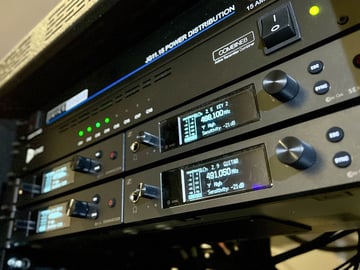
Instead of multiple low quality whip antennas in the rack, the best practice is to use a single remote antenna and antenna distribution (like our DISTRO4, DISTRO5HDR or DISTRO9HDR). Plug all of the mic receivers A&B antenna connections into the DISTRO unit to manage multiple wireless mics, of any brand. Need to expand beyond 9 mics? No problem! You can expand to greater channel counts with any of our systems. Commonly, Antenna distro systems have two BNC input jacks (one labeled A and one labeled B) that go to the antenna outputs. One Diversity series remote antenna in your system will dramatically reduce interference from multiple antennas adding too much noise. RF Venue has several Diversity antennas designed to fit different size and shaped performance spaces(Diversity Fin, Diversity Architectural, or Diversity Omni).
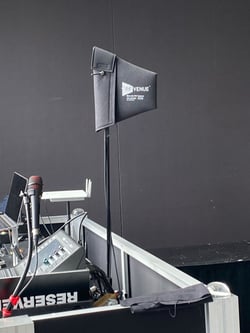
Once things are positioned correctly, take a moment to check RF signal levels at your receivers. If you see a weak RF signal, resist the urge to crank up transmitter power. Active antennas boost signal, but also boost noise. Try moving antennas closer or adjusting positioning to get a better angle or line of sight— small changes often make a big difference in reliability. Line of sight is best.
Raise your antennas to 8-10 feet so you are not shooting through the crowd. Any improvement you can make counts when you’re running more wireless channels for Christmas productions, choirs, or drama teams.
Step Two: Get Clear Insight Into Your RF Noise Environment
You don’t need to be an RF engineer to understand what’s competing for space in your church’s wireless spectrum. Think of your wireless microphones and IEMs like cars on a highway — if traffic gets congested, things slow down or crash.
Between LED walls, stage lighting, and even nearby DTV or 5G/Cellular service affecting your space, there’s often more “RF noise” in the room than you realize. The best way to know what’s happening is to run a quick scan with a Spectrum scanning device during a full rehearsal or service.
You can use a Spectrum Scanner like our Spectrum Recorder or RF Explorer Pro to get a live scan. You then can import the CSV file scan into your favorite frequency coordination software like Wireless Workbench, or our free online Wireless System Builder tool - www.wirelesssystembuilder.com
Need more help with RF Scanning? Just contact our team of experts for help.
If you don’t have a live scanning device, you can skip this step, and easily locate the DTV Channels that present a problem to your church or venue – but be aware that you really need the complete picture of the RF Noise Spectrum in your room to get the best results.
Note: Extraneous noise from LED walls of 5G cell interference will not show up Wireless System Builder unless you provide it with a local RF Scan. If you find interference from these culprits, we have a simple, plug and play solution for that.
Here’s how to get started with Wireless System Builder:
-
On the first page of the Wireless System Builder, enter your local church address or zip code.
-
On the next screen - enter the details of your current wireless system.
-
You can skip the next page about NEW gear (unless you are adding to your basic system for your Christmas presentations)
-
The tool will now display a black screen with red vertical bars. These bars represent the Digital TV (DTV) stations in your area.
-
Wireless System Builder will automatically suggest clean frequencies that avoid these DTV zones
-
And once your set up is configured, you can see the recommended RF Venue accessories for the number of mics/IEM you entered
A key rule: Make sure none of your microphone receivers or in-ear monitor transmitters are tuned to frequencies inside a DTV band (the red zones).
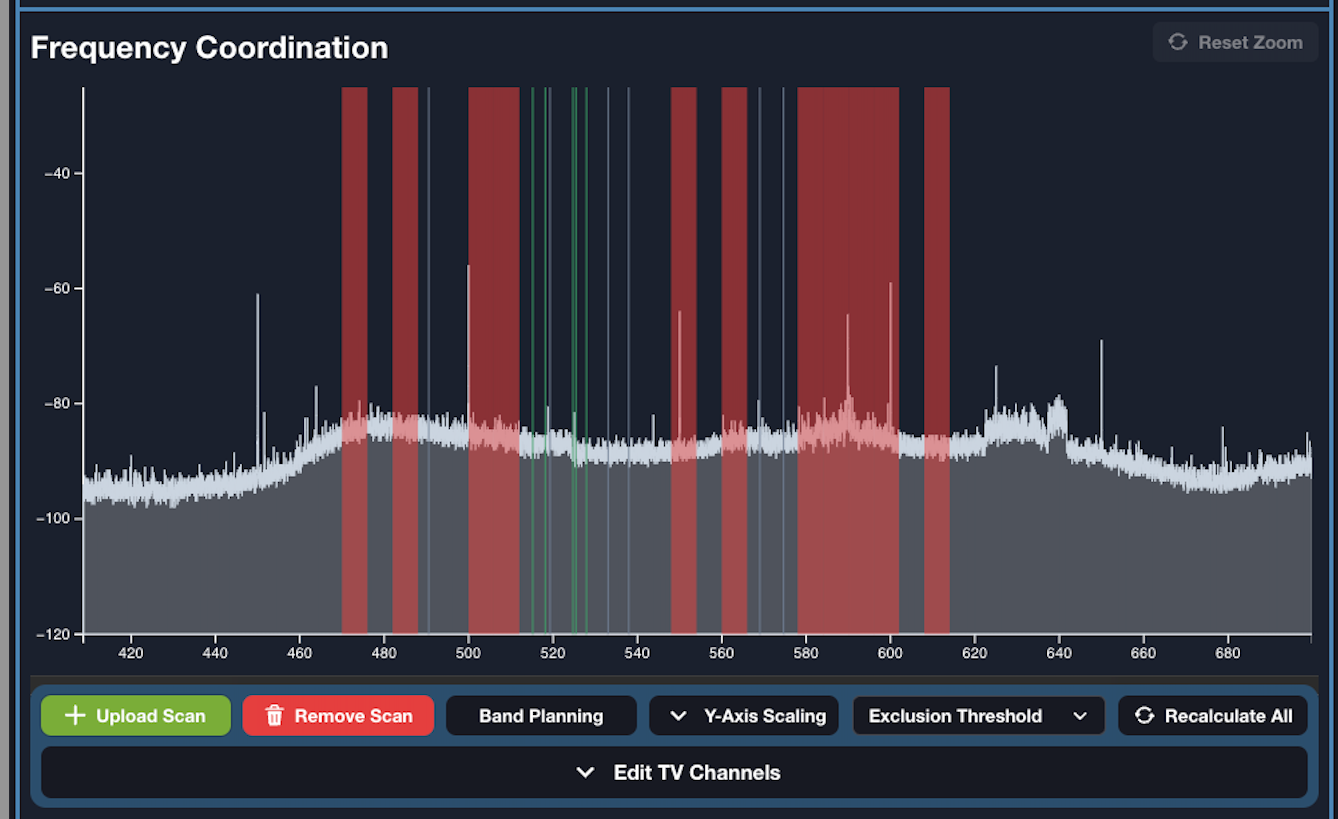
This is why the next step — scanning your performance space with an RF spectrum analyzer — is so important.
A live scan gives you a realistic picture of your RF environment and helps you spot problem frequencies before they show up during a service, rehearsal, or Christmas presentation. Most people don’t know that RF activity changes over time, with more devices competing for less bandwidth. So last year's scan isn’t sufficient for this year's program. That’s why you may have had no problems last week and this week you have a problem that pops up. Scanning gives you clues to sleuth the problem!
In the example graphic above, the red bands show DTV stations, the white trace shows the live RF scan of the room, and the green and blue vertical lines represent suggested safe frequencies for your wireless mics and IEMs. Notice that in the example, several of the white “peaks” (wireless microphones) have selected frequencies that are directly on top of DTV channels — which is exactly what causes real-world dropouts.
If you do have access to a scanner, you can upload its RF data export file to the Wireless System Builder. Once entered, it will provide a list of clean frequencies based on your scan results and your geographic location.
Want to learn more about Wireless System Builder? Watch this Training from our applications engineers.
Step Three: Get frequency coordination right, then stress test it before your program!
Once your system is physically set up correctly with distribution and proper antenna placement, and you have done a live scan of the room, the very next step is essentially a game plan for which frequencies each mic and pack will use.
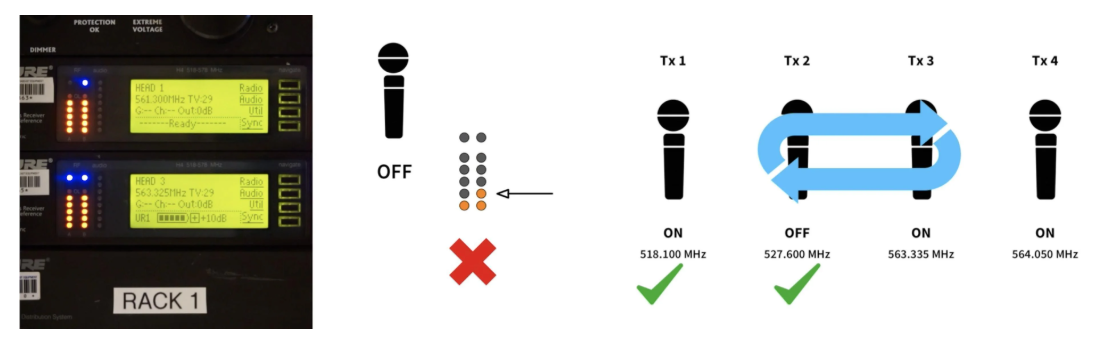
Once you load the clean frequencies into your receivers, turn on all your wireless mic receivers and each transmitter one by one, ensuring that, when a transmitter is off, that there is no RF signal present on the RF meters on the front of the receivers. If there is RF signal at the receiver when a transmitter is off, then you will need to choose another frequency from your coordination list and start the process over again from the first microphone.
This step may take a few minutes, but it’s worth every second. When you’ve verified that all mics and IEMs are clean and interference-free, you can walk into your service with confidence knowing your wireless system is ready to ensure your message is heard clearly.
Final Touches Before Showtime
-
Swap in fresh batteries for every performance — it’s the simplest and most overlooked failure point.
-
Label every mic and pack to avoid last-minute confusion.
-
Have a backup plan — having a spare handheld or wired mic can save the day. Make sure the talent knows the backup plan.
If you’re still unsure about your setup, just contact us! Our RF Experts are always happy to help. Even under a time crunch.
Focus on What Matters Most
The holiday season is the most mission-critical time of year for worship production. Your congregation is listening closely, and your message deserves to be heard without distraction or dropouts.
With a little preparation you can approach every service with confidence, knowing your wireless system is solid, your signal is clear, and your team can focus on what truly matters: sharing the message of hope this season brings. If you need assistance, contact our team of experts for help.