When live event audio needs to reach beyond the main PA system, production teams typically face a choice:
Run long cable infrastructure across the venue — or deploy the RF PA Extension Kit.
For many temporary events, wireless PA distribution can dramatically reduce setup complexity while improving flexibility across changing site layouts.
This guide walks through the key planning considerations, deployment best practices, and specification factors production teams should evaluate before implementing a wireless PA extension system.
1. Where Wireless PA Extension Adds Value
RF PA Extension systems are most effective when remote audio zones are difficult, time-consuming, or costly (and even hazardous) to run cable.
Typical applications include:
- Audience walk-in areas
- Intermission and coffee break spaces
- Delay towers
- Outdoor overflow areas
- VIP and hospitality zones
- Breakout rooms
- Satellite tents
- Temporary worship spaces
- Fan zones and sponsor activations
The larger the venue, the more operational advantages wireless PA deployment can provide.
2. Understand the Core System Components
RF PA systems include these core elements:
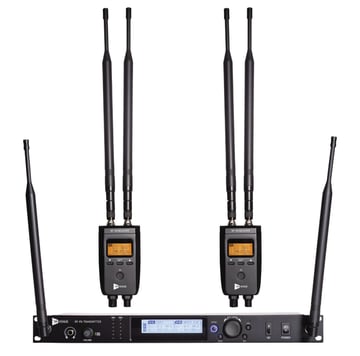
RF PA Rack Transmitter
The RF PA transmitter accepts two mono or stereo analog line level audio inputs typically from the main mix position or a DSP system and broadcasts it wirelessly to remote RF PA receiver speaker locations.
Typical integration points include:
- A Stereo Mix out from a mixer or console
- Mono/Stereo Bus output / or Matrix outputs
- Auxiliary sends
- DSP outputs
- Console direct outputs
- Onboard dual mono/stereo TRS Line level throughput to secondary feed
RF PA Receiver
RF PA Receivers are deployed with remote loudspeaker systems and convert the wireless transmission back into line level audio output for powered speakers.
Multiple RF PA receivers can operate from a single RF PA transmitter.
Antenna System
Proper antenna placement directly impacts RF stability, range, and system reliability.
Deployment considerations include:
- Clear line-of-sight
- Front mounted antennas and elevated positioning
- Distance from metal structures
- Avoid excessive RF congestion with RF Coordination
3. Plan Your Coverage Zones Before Deployment
Before arriving onsite, map every intended audio zone.
For each location, document:
- Distance from FOH
- Power availability
- Speaker locations
- Mounting requirements
- Potential RF obstructions
- Audience density
- Delay timing requirements
This allows teams to determine:
- Receiver quantity
- RF coverage strategy
- Delay alignment needs
A pre-event RF and infrastructure plan reduces troubleshooting during load-in.
4. Evaluate local RF noise
Not all wireless audio systems are designed for live professional events. You might be able to use wireless mics and IEMs for this task, but that gets expensive and complicated very quickly.
Here are the most important specifications to evaluate.
Frequency Band Planning
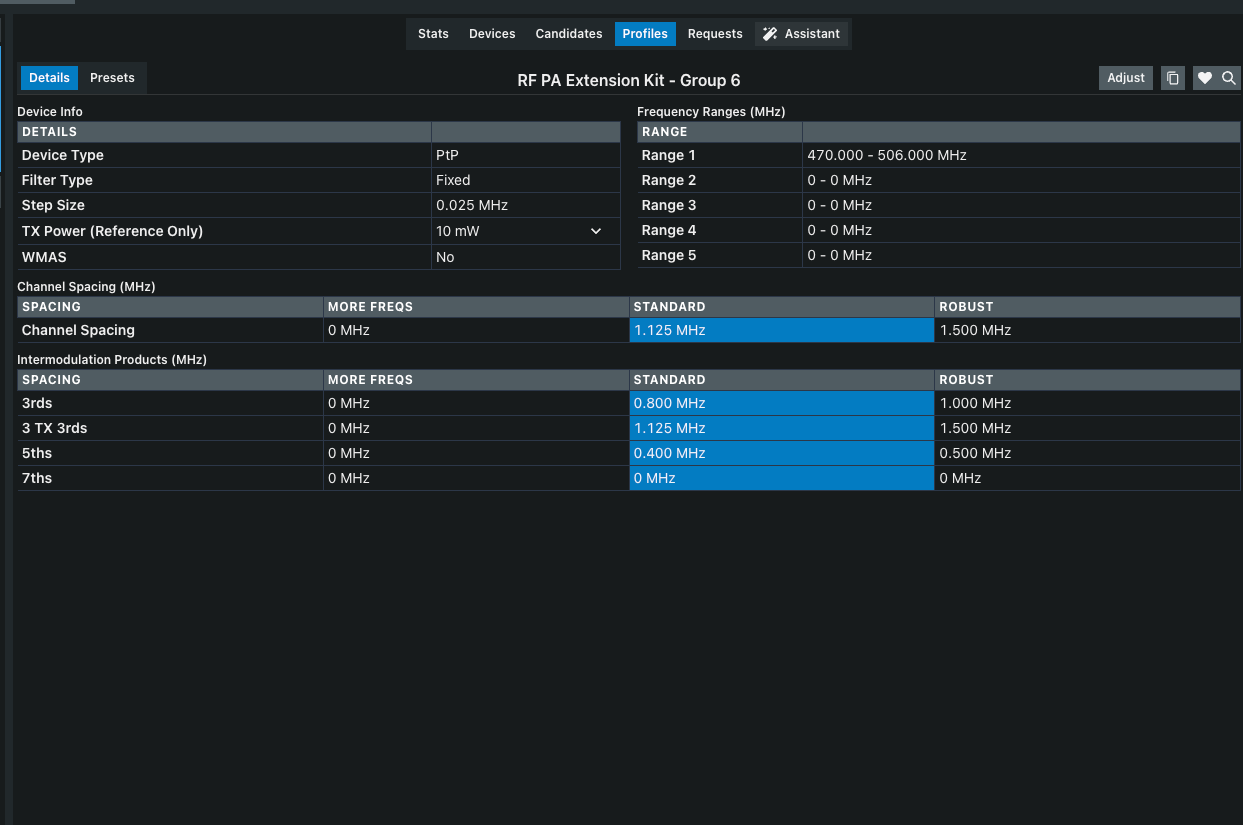
RF PA Extension Kit operates in the UHF band for improved stability and long-range performance. Frequency coordination must not be overlooked.
Consider:
- Local spectrum regulations
- Use a Spectrum Analyzer to see the local RF noise
- Consider existing wireless microphone usage
- Follow usual RF Coordination requirements (RF Venue can help you)
- Use a frequency coordination software program
Frequency coordination is especially important for festivals and corporate productions with multiple wireless systems onsite. Now easier than ever with Wireless System Builder
Pro Tip: You can also create a generic profile with SoundBase as well, and it is easy to create a generic profile in Shure’s Wireless Workbench.
See device details below:
Latency
Latency directly affects audience perception and system synchronization.
For PA extension:
- Lower latency is generally preferred (RF PA uses analog FM design for ultra low latency)
- Delay adjustment capability is critical for alignment
- Consistent latency matters more than variable latency
Systems designed specifically for live sound reinforcement typically prioritize predictable real-time performance.
RF PA Receiver Scalability
Some deployments require only one remote zone.
Others may require:
- Multiple delay towers
- Several breakout rooms
- Distributed outdoor coverage
Need more than 2 or 4 areas to cover? RF PA is also bundled with 8 RF PA Receivers at a discount (save $324 over individual components)
Transmission Range
Range requirements vary significantly based on venue type and local RF noise conditions. Check out this range test
Key considerations:
- Indoor vs outdoor deployment
- Line-of-sight availability
- Structural obstructions
- Antenna placement height
- RF interference environment
Always test deployment distances under real-world conditions whenever possible.
5. Installation Best Practices
Elevate Antennas or use Remote antennas to avoid line of sight issues
Higher antenna placement generally improves signal reliability and coverage consistency.
Whenever possible:
- Mount included antennas on the front of the RF PA Transmitter
- Place on top of audio rack
- Maintain clear transmission paths
- Avoid placing antennas near truss or metal objects
Maintain RF Separation
Keep wireless PA extension systems separated from:
- Wireless microphone antennas
- Wi-Fi access points
- Intercom RF systems
Proper frequency spacing helps minimize interference.
Protect RF PA Receiver Locations
Outdoor deployments require attention to:
- Weather exposure
- Heat management
- Secure mounting
- Cable strain relief
Temporary deployments need professional infrastructure standards.
6. Set Audio Delay Properly
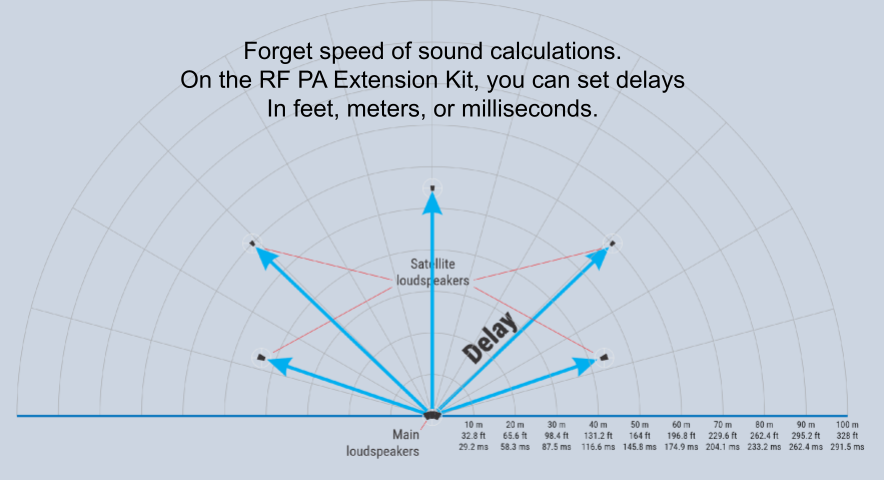
Delay timing is essential for distributed audio systems. With RF PA, you can stop doing speed of sound calculations.
Improper alignment can create:
- Echo perception
- Phase issues
- Reduced intelligibility
- Audience distraction
General best practice:
- Measure physical speaker distance
- Apply appropriate delay compensation
- Verify timing during system tuning
RF PA Receivers make this easy with onboard delay up to 800ms (can be set in meters or feet)
7. Questions to Ask Before Selecting a System
Before deploying RF PA, production teams should evaluate:
- How many remote zones need coverage?
- What are the maximum deployment distances?
- Will the system operate indoors, outdoors, or both?
- What RF systems already exist onsite?
- How critical is low latency?
- How quickly must the system deploy?
- Will the system scale for future events?
The answers will help determine the best architecture for the application.
Final Thoughts
Temporary events demand flexibility.
As production environments become larger and more distributed, RF PA Extension Kits are helping teams simplify deployment while maintaining reliable audio coverage across complex venues.
The key to success is planning:
When deployed correctly, RF PA Extension Kits can reduce setup friction, improve operational agility, and create cleaner event infrastructure for both crews and attendees.